When you hear “DMCA takedown process”, it sounds serious and confusing. Many website owners think it means instant shutdown or legal trouble.
But let me ask you honestly:
Do you really know what happens step by step when a DMCA complaint is filed against your website?
Once you understand the process clearly, most of the fear disappears.
So let’s walk through this slowly, practically, and in real terms, as if we are discussing your own website.
Table of Contents
First, What the DMCA Takedown Process Really Is
The DMCA takedown process is a structured workflow created to handle copyright complaints online.
It is not a single action.
It is not instant punishment.
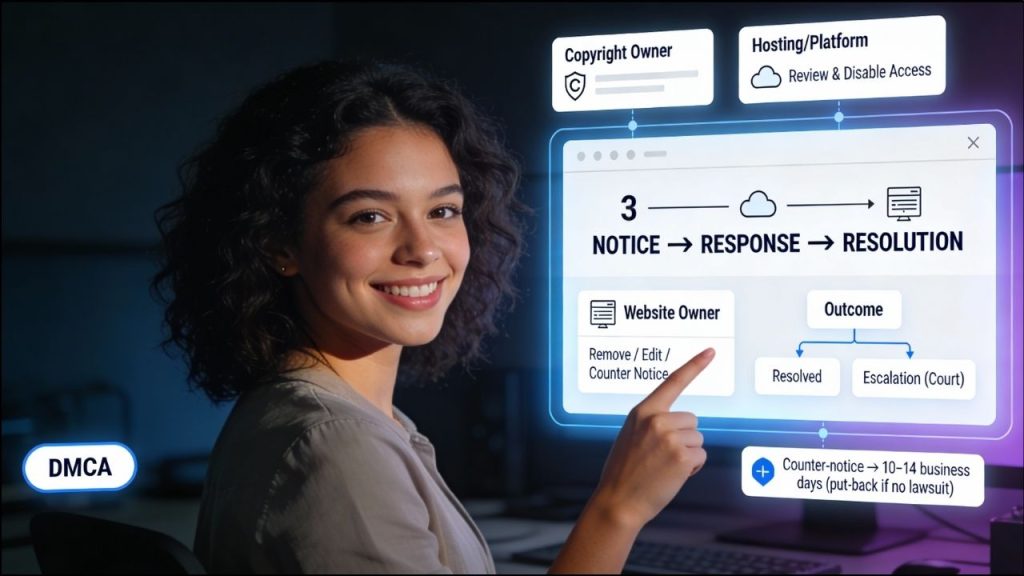
It is a notice → response → resolution system.
The goal is simple:
Give copyright owners a way to report issues, while giving website owners a chance to respond.
How the DMCA Takedown Process Works – (Step-by-Step Guide)
So what actually happens after someone files a DMCA complaint against your website? Does everything stop at once, or do you get time to react This is where most confusion begins. In this part, the full process is explained in the exact order it usually happens.
You’ll see who takes the first step, why your hosting provider responds quickly, and when the situation reaches you. As you read, it will feel less like rules and more like a clear conversation, so you always know what to expect and what to do next.
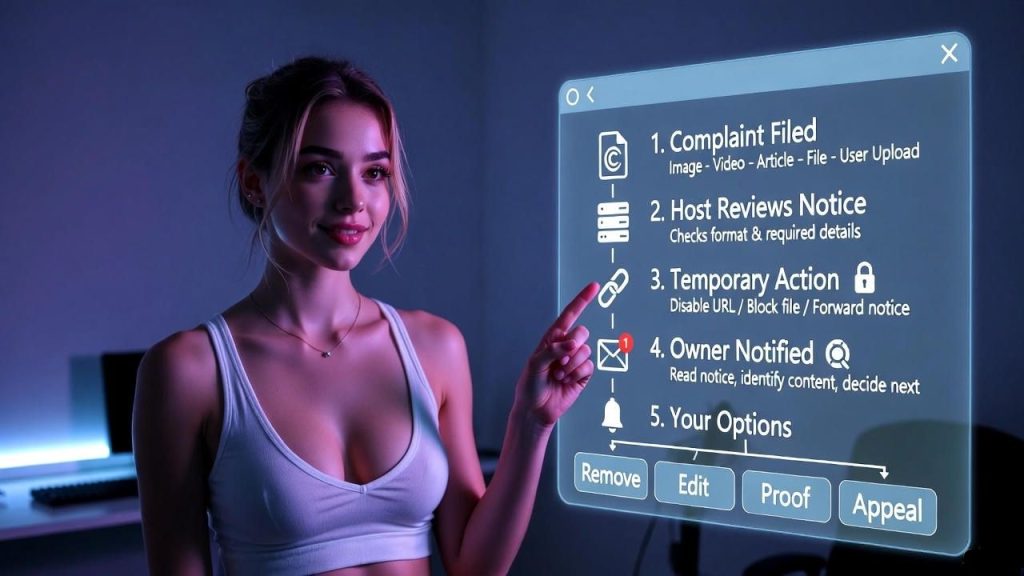
Step 1: A Copyright Complaint Is Filed
Everything starts when someone believes that content on your website uses their copyrighted work without permission.
This could be:
- An image
- A video
- An article
- A downloadable file
- User uploaded content
They prepare a DMCA complaint and usually send it to your hosting provider, not directly to you.
At this stage, remember one thing:
This is only a claim, not a decision.
Step 2: Hosting Provider Reviews the Complaint
Now let me ask you something important.
Does your hosting provider check whether the complaint is 100% true?
The honest answer: No.
The host only checks:
- Is the complaint properly written?
- Does it include required details?
- Does it look valid under DMCA rules?
Why so limited?
Because hosting providers are not judges. Their responsibility is to respond, not investigate deeply.
Step 3: Temporary Action on the Reported Content
Once the host considers the complaint valid, they take temporary protective action.
This may include:
- Disabling access to a specific URL
- Blocking a particular file
- Forwarding the notice to you with instructions
Important point you should notice here:
The action is almost always content specific.
It’s about one page or one file, not your entire website.
Step 4: You Are Notified and Expected to Act
Now the process reaches you.
This is the most important stage for a website owner.
You are expected to:
- Read the notice carefully
- Identify the reported content
- Decide how to respond
You are not expected to panic.
You are expected to take responsibility and act.
Step 5: Your Response Options
At this stage, you usually have four realistic options:
- Remove the content: If the claim is correct or you don’t want risk.
- Replace or edit the content: Remove copyrighted parts and keep the rest.
- Provide proof of ownership or permission: If you legally own the content.
- Submit a DMCA counter notice: If you believe the claim is wrong.
Most cases end at option 1 or 2.
Step 6: Resolution or Escalation
This is the final part of the DMCA takedown process.
- If you fix or remove the content → the issue usually ends
- If you ignore the notice → the host may suspend services
- If you submit a counter notice → the complainant must take legal action to continue
Only a small number of cases ever reach courts.
Most are resolved quietly.
DMCA Takedown Process Timeline
Here’s a clear table so you can see the full flow at a glance:
| Stage | Who Acts | What Happens | Impact on Your Website |
| Complaint Filed | Copyright owner | DMCA notice sent to host | No immediate change |
| Initial Review | Hosting provider | Checks notice validity | Still live |
| Temporary Action | Hosting provider | Specific content limited | One page/file affected |
| Owner Response | You | Remove, edit, or counter | Issue usually resolves |
| Final Outcome | Host / Complainant | Case closed or escalated | Site remains stable |
This table shows something very important:
The process is gradual, not sudden.
What the DMCA Takedown Process is NOT
Let’s clear common fear points clearly.
The DMCA takedown process is not:
- Instant website deletion
- Automatic account termination
- Proof that you are guilty
- A criminal procedure
It is a controlled system designed to avoid chaos.
Why Most Website Owners Run Into Trouble
Here’s the honest reason problems happen.
Not because of DMCA itself, but because:
- Notices are ignored
- Emails are not read carefully
- Website owners panic or overreact
- Content ownership is not tracked
Understanding the process prevents all of this.
Why Knowing This Process Protects You
Once you understand the DMCA takedown process:
- You don’t panic when a notice arrives
- You know exactly what step you’re on
- You respond calmly and correctly
- You protect your hosting and website reputation
Knowledge gives you control.
Conclusion
The DMCA takedown process is not designed to scare you or shut down your website overnight. It is a clear, step-by-step system that focuses on notice, response, and resolution.
When you understand how each stage works, you stop reacting emotionally and start acting responsibly. Most issues are resolved quietly when handled on time. Knowledge of this process keeps your website stable and under your control.